Capture full screen, a tab, or a selected area with your face, your voice, and system audio. The file is yours the moment you stop, saved to your computer, no account, no upload wall. Need to send it? One click makes an unlisted link, ideal for handing recording to your team or VAs.
No new tab. No upload spinner. The recording is yours, on your machine, the moment you press stop.
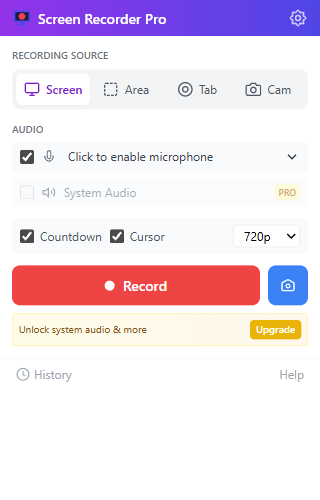
Screen, a single tab, your camera, or draw an area to crop just the part you want. Each mode is one click in the popup.
Pick a microphone, toggle system audio, and the recording captures both cleanly. Echo cancellation and noise suppression are on by default.
Hit record. Pause and resume freely. Stop, then trim, convert to MP4 or GIF, or upload to a shareable link with one click.
The source picker matches the real extension: screen, area, tab, or camera. The visual on the right shows a real work page with the selected region drawn over useful content.
Capture a full monitor for demos and walkthroughs.
Draw a frame around the exact panel you want recorded.
Record a browser tab with its audio at source quality.
Use webcam-only or add picture-in-picture narration.
Hour-long demos. Multi-take tutorials. A floating REC widget on every tab, accurate pause timing, and recordings that survive Chrome's service-worker idling.
WebM by default. Convert to MP4 in seconds with our FFmpeg-powered exporter, trim with drag handles, or feed your recording straight into ChatGPT, Claude, or your favorite tool with one-click transcript export.
Cloud recorders upload every take to their servers, then charge you to download your own video. Screen Recorder Pro works the other way round: the file lands on your computer the instant you stop.
The minimum tier that lets you download your own recording.
Everything unlocked. The free tier already downloads and shares.
~84% cheaper, per seatNo fake named testimonials. Just the practical use cases Screen Recorder Pro is built around.

Record a customer repro, crop to the broken panel, and send the file without forcing a cloud upload.

Capture a tab, microphone, and cursor movement so an async update is clear without a meeting.

Use area mode to keep attention on the lesson, rubric, or browser tab instead of the whole desktop.
Free forever for 3 recordings a day with a short end-card on exports. Pro is one click away when you need clean exports, system audio, MP4 export, and AI-ready transcripts.
